
Introduction
Computer networks can be built in many ways depending on scale, purpose, and performance requirements. Modern networking uses a combination of wired, wireless, and virtualized technologies. Devices such as routers, switches, access points, and firewalls form the backbone of both home and enterprise networks.
This section explains common network examples using current technologies and terminology.
Loopback Network

The loopback interface is a special virtual network interface used for testing and diagnostics within a single device.
- IPv4 loopback address:
127.0.0.1 - IPv6 loopback address:
::1
The loopback interface allows a computer to send network traffic to itself without using any physical network hardware.
Common uses:
- Testing network applications locally
- Verifying TCP/IP stack functionality
- Running local web servers and services
The loopback interface is essential in modern operating systems and is always enabled by default.
Two-Computer Network (Direct Connection)
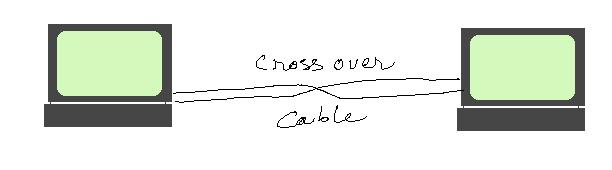
Two computers can be connected directly using:
- Ethernet cable (modern NICs support auto MDI-X, so crossover cables are usually not needed)
- Wi-Fi Direct (wireless peer-to-peer connection)
Uses:
- File transfer
- System backup
- Development and testing environments
Modern systems often use:
- SMB (Windows file sharing)
- SSH/SCP (Linux/macOS secure transfer)
Multiple computers can be connected using a hub:
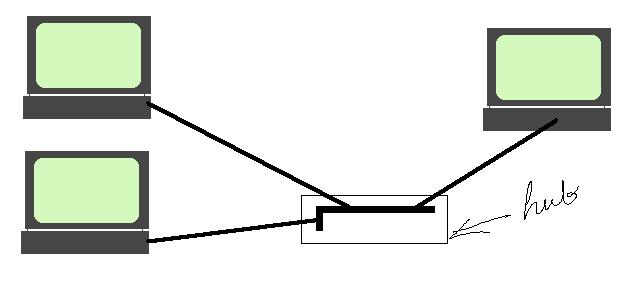
A hub has a number of ports. Computers can be plugged into these ports. Every packet entering the hub through a port is broadcast to other ports. Hub is a Layer 1 (physical layer or hardware) device. Hubs are inefficient, but useful in scenarios where every computer connected to the hub should receive all packets.
Direct connections are less common today due to widespread use of switches and wireless routers.
Switch-Based Network (Modern LAN)
A network switch is the central device in most modern local area networks (LANs).
How switches work:
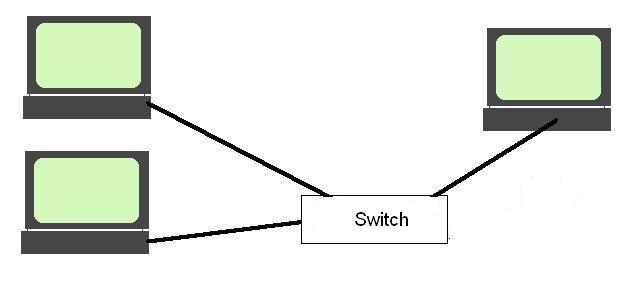
- Operate primarily at Layer 2 (Data Link Layer)
- Forward frames based on MAC addresses
- Build MAC address tables dynamically
- Send data only to the intended device instead of broadcasting
Advantages over hubs:
- Higher performance
- Reduced collisions
- Better security
- Full-duplex communication
Modern switches:
- Managed switches support VLANs, QoS, and security policies
- Unmanaged switches are used in simple home networks
Bridging and Network Segmentation
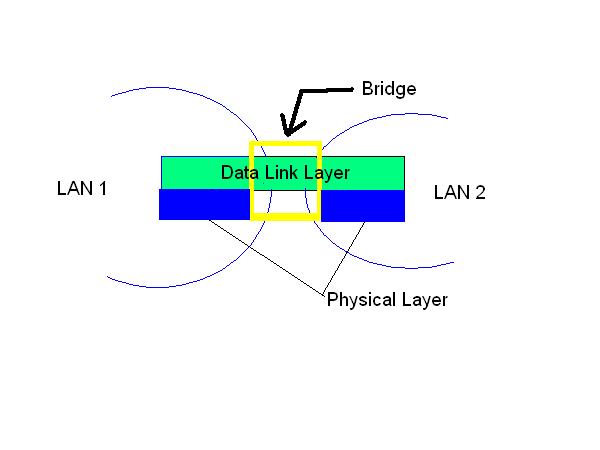
A bridge connects two network segments and operates at Layer 2.
Modern perspective:
In today’s networks, traditional bridges are largely replaced by:
- Managed switches
- Virtual bridges in operating systems and hypervisors
- Cloud virtual networking components
Key functions:
- Forwards traffic based on MAC addresses
- Filters traffic between segments
- Reduces unnecessary traffic between networks
Important concept: loops
Modern networks prevent loops using:
- Spanning Tree Protocol (STP)
- Rapid Spanning Tree (RSTP)
- Mesh-aware protocols in wireless networks
Routed Networks (Modern Internet-Style Networking)
A router connects different networks and operates at Layer 3 (Network Layer).
Router functions:
- Forwards packets based on IP addresses
- Uses routing tables to determine best path
- Connects LANs to WANs and the Internet
- Performs Network Address Translation (NAT) in home networks
Routing types:
- Static routing (manually configured)
- Dynamic routing (using protocols like OSPF, BGP, RIP)
Modern routers often include:
- Firewall functionality
- VPN support
- Parental controls
- Traffic shaping and QoS
Layer 3 Switches
A Layer 3 switch combines switching and routing capabilities.
Features:
- High-speed switching like a Layer 2 switch
- IP routing between VLANs
- Hardware-accelerated packet forwarding
Common uses:
- Enterprise networks
- Data centers
- Campus networks
Layer 3 switches reduce the need for separate routers in internal networks.
Home Networks (Modern Architecture)
A typical modern home network includes multiple integrated devices rather than separate components.
Core Components:
1. Modem (ISP Connection)
Connects the home network to the Internet Service Provider (ISP).
Types:
- Cable modem (DOCSIS)
- Fiber ONT (Optical Network Terminal)
- DSL modem (legacy but still in use in some areas)
2. Router / Gateway Device
Modern home routers are usually all-in-one gateways that include:
- Router
- Firewall
- NAT
- DHCP server
- Wi-Fi access point
3. Wi-Fi Access Point
Modern Wi-Fi standards include:
- Wi-Fi 5 (802.11ac)
- Wi-Fi 6 (802.11ax)
- Wi-Fi 6E (6 GHz band)
- Emerging Wi-Fi 7
Features:
- Higher speed
- Lower latency
- Better support for multiple devices
- Improved efficiency in crowded environments
4. Mesh Wi-Fi Systems
Instead of a single router, many homes now use mesh networks:
- Multiple nodes spread across the house
- Seamless roaming between access points
- Better coverage in large homes
Connected Devices in Home Networks
Modern home networks support:
- Laptops and desktops
- Smartphones and tablets
- Smart TVs and streaming devices
- IoT devices (smart lights, thermostats, cameras)
- Network printers
- Gaming consoles
Many devices now use cloud-based services rather than local network-only communication.
Network Printing and Peripherals
Network Printers:
Modern printers connect via:
- Wi-Fi
- Ethernet
- Cloud printing services (Google Cloud Print alternatives, manufacturer cloud apps)
Scanners and IoT Devices:
Often integrated into multifunction devices or cloud-connected systems.
Wireless Personal Area Networks (PAN)
A Personal Area Network (PAN) connects devices over very short distances.
Bluetooth (Modern Standard)
Bluetooth is widely used for short-range communication.
Uses:
- Wireless headphones and earbuds
- Smartwatches
- Keyboard and mouse connections
- File transfer between devices
- IoT device pairing
Modern Bluetooth versions:
- Bluetooth 5.x and 5.3
- Improved range, speed, and energy efficiency
- Better support for audio streaming and IoT devices
Other PAN Technologies
- NFC (Near Field Communication): used for payments and quick pairing
- Ultra-Wideband (UWB): precise device tracking and spatial awareness
Modern Networking Trends
Modern networks are evolving toward:
- Cloud-managed networking
- Software-defined networking (SDN)
- Zero Trust security models
- IPv6 adoption
- Edge computing integration
- AI-based network optimization
Networks are no longer static—they are dynamic, scalable, and increasingly automated.
Summary
Basic networking concepts such as loopback, switching, routing, and wireless communication remain fundamental. However, modern networks are far more advanced, incorporating cloud services, virtualization, high-speed wireless standards, and intelligent management systems.
Understanding these foundational examples helps explain how today’s home, enterprise, and Internet-scale networks operate efficiently and securely.
- Log in to post comments
Comments